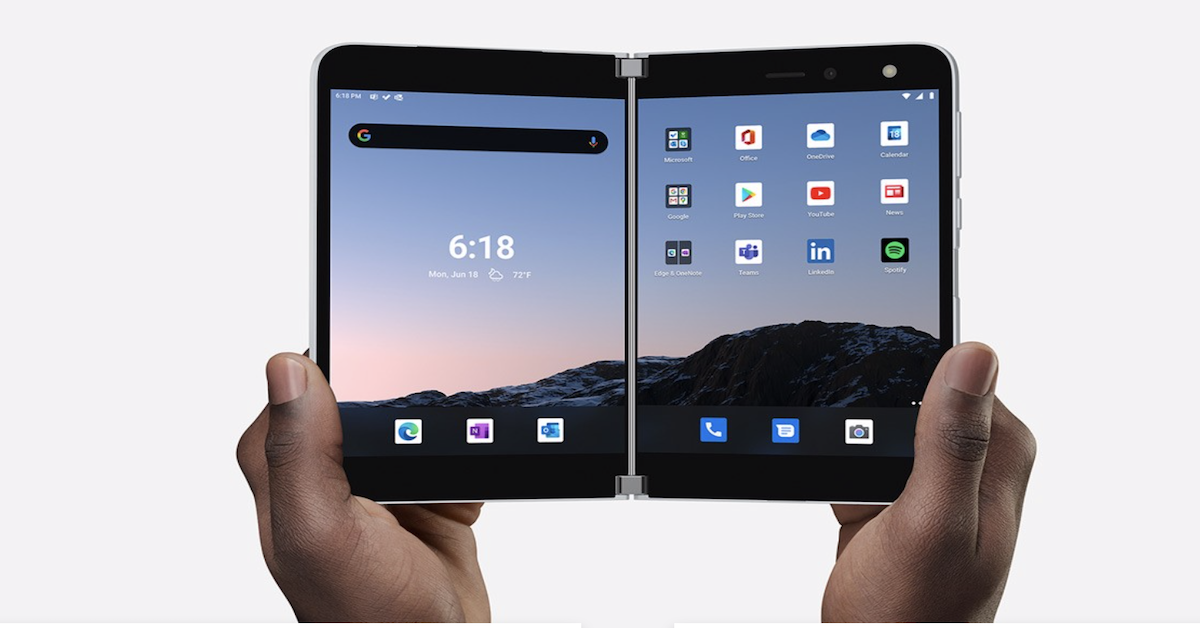
This weblink features the myriad ways Microsoft's new Surface Duo is helping professionals do one better. With the Duo, Surface innovation comes to a mobile device. Two screens support extreme productivity, while multiple modes offer flexibility. Plus, users can realize the best of Microsoft 365, together with Android apps, with everything in the Google Play store at their fingertips. Finally, its original design is unlike any other, allowing individuals to work smarter from anywhere. Contact us today for more information.
What makes Surface Pro for Business different from regular Surface Pro devices?
Surface Pro for Business is designed specifically for organizations that need centralized management, security, and scalability across many devices.
Key differences and benefits for businesses include:
- Business-grade OS: Surface Pro for Business runs Windows 11 Pro, while consumer models typically run Windows 11 Home. Windows 11 Pro supports enterprise features like domain join, advanced security, and management tools.
- Enterprise security: Every Surface Pro for Business is a Secured-core PC, with protections from chip to cloud. Security features include Microsoft Pluton (hardware-based protection for identities and encryption keys), BitLocker, and Windows Hello for secure authentication.
- Zero Trust–ready: Devices are built to support Zero Trust principles, verifying access and enforcing least privilege to help reduce exposure to threats.
- Advanced IT management: IT teams can use Microsoft Intune and DFCI to remotely configure UEFI settings, manage firmware, and apply policies at scale.
- Zero-touch deployment: With Windows Autopilot, devices can be configured in minutes and shipped directly to employees, reducing IT overhead.
- Lifecycle and repairability: Many models include removable SSDs and modular, replaceable components, helping extend device use and simplify repairs.
- Commercial support and insights: Organizations can use the Surface Management Portal for proactive fleet insights and the Surface IT Toolkit for hands-on remediation. Microsoft Protection Plans help protect the investment and avoid surprise costs.
In short, Surface Pro for Business reimagines the familiar 2-in-1 form factor for IT-managed environments, combining portability and performance with enterprise-grade security and control.
How does Surface Pro for Business support AI-powered productivity?
Surface Pro for Business is built to bring AI directly into everyday workflows, using dedicated NPUs and integrated Microsoft tools.
Key AI-related capabilities include:
- Built-in NPUs for on-device AI: New Surface Pro for Business models with Snapdragon X or Intel Core Ultra processors include dedicated NPUs delivering up to 50 or 80 TOPS of AI performance. This keeps many AI workloads on the device for responsiveness and privacy.
- Copilot integration: Employees can interact with Copilot via keyboard, touch, or voice to get real-time assistance, summarize information, and automate routine tasks. A dedicated Copilot key on supported keyboards provides quick access.
- Microsoft 365 AI experiences: With the right licensing, users can access Copilot in Microsoft 365 to draft content, analyze data, and streamline collaboration across apps like Word, Excel, PowerPoint, and Teams.
- Windows AI features: Features like Recall, Copilot Chat, and improved Windows Search help employees quickly find past activity, content, and context across their workday.
- Custom AI agents and workflows: IT and business teams can build organization-specific AI experiences using Windows AI Foundry, Copilot Studio, and Copilot Agents, tailoring workflows to their processes.
- AI-enhanced communication: Cameras and Windows Studio Effects use AI to improve video calls and collaboration, while AI-ready hardware accelerates these workloads without overloading the CPU.
Together, these capabilities help teams rethink how they work—from finding information faster to automating repetitive tasks—while keeping AI processing close to the user on secure, managed devices.
Which Surface Pro for Business hardware options are available for my team?
Surface Pro for Business gives organizations a flexible hardware lineup so they can match devices to different roles and workstyles.
Form factor and sizes
- 2-in-1 design: Works as both a tablet and a laptop, with a built-in kickstand and support for detachable keyboards and pen input (sold separately).
- Two main sizes: 12-inch and 13-inch (measured as standard rectangles; actual viewable area is slightly less due to rounded corners).
Processor and AI options
- Snapdragon X2 / X Plus / X Elite options with a dedicated NPU delivering up to 80 TOPS for AI workloads and exceptional battery life on select models.
- Intel Core Ultra (Series 2 and Series 3) options with NPUs delivering up to 50 TOPS, designed for AI-enhanced communication and performance-intensive tasks.
- Memory configurations of 16GB, 32GB, or 64GB LPDDR5x RAM to support demanding workloads.
Display and input
- PixelSense Flow touchscreens in 12-inch or 13-inch sizes.
- Anti-reflective displays designed to minimize unwanted reflections and certified to meet ISO 9241-307 requirements.
- Optional OLED on select 13-inch Intel and Snapdragon models for deeper contrast and richer color—useful for design, media, and visual storytelling.
- Support for pen input with natural, pen-on-paper precision and detachable keyboards with large glass touchpads and Copilot keys (each sold separately).
Connectivity and expansion
- Wi-Fi 7 and Bluetooth 5.4 for fast, modern wireless connectivity.
- Optional 5G on select 13-inch Intel and Snapdragon models for teams that work beyond traditional office networks.
- Support to dock up to three 4K external displays for a full workstation setup (with compatible accessories).
Durability and sustainability
- Lightweight, durable enclosures; on select devices, 86% of the enclosure is made with recycled content.
- Use of 100% recycled aluminum alloy in the enclosure bucket and 100% recycled rare earth metals in magnets on select models.
- Modular components and removable SSDs to support easier repair and extended device use.
By mixing and matching these options—processor family, RAM, display type, connectivity, and size—organizations can equip hybrid workers, frontline staff, and power users with devices that fit how and where they work.



 Sign in with LinkedIn